


This report lists errors found in sales transactions sent to Park City Group in batch. For example, a Store Movement Error Report is created when a retailer is reporting sales for a store, but the supplier does not have the item set up or authorized in their item catalog.
If errors are found, this report is generated and sent immediately after the sales file is processed.
You should react immediately upon receipt of this report, as this means that a portion of your data was not accepted. Quick action on your part will prevent delays and inaccuracies in the data exported to your trading partners.
See View Sales Errors to review errors online.
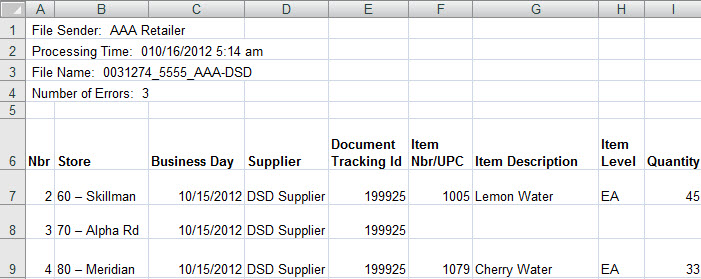
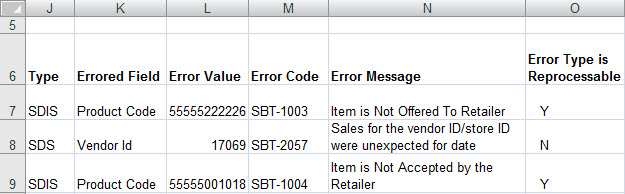
Header
|
Field Name |
Description |
|
File Sender
|
The retailer or supplier that provided the data to Park City Group. |
|
Processing Time
|
The time the file was processed into Park City Group. |
|
File Name
|
The name of the file as processed by Park City Group. |
|
Number of errors
|
The number of errors found. |
|
Col |
Field Name |
Description |
|
A |
Nbr (number) |
Park City Group's internal record number used when processing the file. |
|
B |
Store |
The ID and name of the store in which the sales took place. |
|
C |
Business Day |
The business date on which the sales took place. |
|
D |
Supplier |
The supplier whose items were sold. |
|
E |
Document Tracking ID |
ID assigned by the sender to identify a "batch" of sales reported. Often used when tracking sales sent for multiple stores/business days. |
|
F |
Item Nbr/UPC |
The item order number or UPC assigned to the item in Park City Group. |
|
G |
Item Description |
The supplier's item description. Available for item-level errors only. |
|
H |
Item Lvl (level) |
The hierarchy level at which the item was reported. CA - Case IP - Inner Pack EA - Each |
|
I |
Qty (quantity) |
Number of units sold. |
|
J |
Type |
Code listing the type of error. SDIS – Store Daily Item Sales error. SDS – Store Daily Sales error. SDAY – Store Day Sales error. Note: SDIS errors are associated with the specific items reported. SDS errors are associated with the overall file, such as invalid store identifiers. SDAY errors are based on the Business Day reported. |
|
K |
Errored Field |
The field in error. |
|
L |
Error Value |
The value provided in the errored field. If the error was caused by a missing value, this field will be blank. |
|
M |
Error Code |
The code associated with the error. A complete list of error codes is available here. |
|
N |
Error Message |
The error message associated with the Error Code. This field lists the reason for the error |
|
O |
Error Type is Reprocessable |
Lists if error can be reprocessed automatically -- after correction in the Park City Group database -- without resending the file. Reprocessable errors are generally item-based errors. See Errors Eligible for Reprocessing for a complete list. |
Updated 11/27/2012