


Use this page as a guide to working with the VMP Management tools in distribuLink. Note that these options require special authorization, and do not appear for causal distribuLink users.
Notifications
/ Report Samples  VMP and related Job Schedules


VMP promotions temporarily lower the PTC (Price to Consumer) and/or PTR (Price to Retailer) of selected items in one or more stores. These are set up by the VMP Analyst in cooperation with the retailer. See the help links in this topic for a variety of promotion-related tasks.
Manage Proxy Distributor Costs
Use this tool to manually enter/update pricing
for distributors set up as proxies prior to their becoming fully implemented
in Park City Group. This allows the pricing to be included in VMP exports
to the retailer. 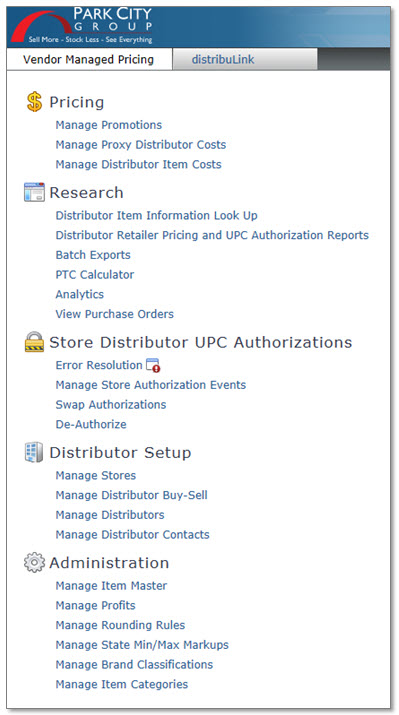
This screen allows the VMP Manager to enter distributor PTR (Price to Retailer) costs on behalf of Park City Group and Non-Park City Group Distributors. Pricing can be entered in Cost Zones authorized to Walmart or other VMP retailers only.
A link to the PTC (Price to Consumer) calculator is available for determining the desired PTR.

Distributor Item Information Look Up
The Distributor Item Info Look Up option is a research tool for comparing the distributor catalog and VMP exports with the items/prices in the retailer's system. Detailed information is included about VMP batches, such as when they were sent and which items were authorized, as well as quick links to view store/cost zone and Master Item assignments.
Because visibility is provided for many areas across the VMP process, this screen should be your first stop when issues arise.
Distributor Retailer Pricing and UPC Authorization Reports
This ad hoc report lists a distributor's costs for items authorized in selected stores. It includes the effective costs (Price to Retailer – PTR) and retail selling price (Price to Consumer – PTC) of each item, as well as information about how an authorization was added. Options are one item/multiple stores, multiple items/one store, and report by authorization Type.
Use this screen to review authorization and pricing exports sent to the VMP retailer. It lists what was sent and when, as well as any errors that occurred. A Resend option is available to resubmit the batch, and is used to either resubmit erred records after correction or to resend batches that were error free but not received by the retailer.
PTC (Price to Consumer) Calculator
Use the PTC Calculator to calculate the PTC (Price to Consumer) of an item based on the distributor's PTR (Price to Retailer) and the margin set up for a store. A "sanity" check is performed automatically to ensure the PTC falls within the minimum/maximum markup allowed.
Use this to view Purchase Order transactions sent by Walmart for distributor-to-store fulfillment. These transactions originate as EDI 850 data using GXS B2B data exchange protocols. Purchase Order data flows from Walmart > PCG > GXS to the Distributors. Upon receipt, Park City Group validates content, generates reporting for any exceptions found and distributes the Purchase Orders to GSX.

Use this screen to review brand owner errors and review/resolve errors in the authorization queue. The application alerts you when errors are present by displaying a red symbol beside the option on the main menu. This menu item is also used to accept or reject distributor proposals for item/store de-authorizations.
Manage Store Authorization Events
Use this task to manage temporary distributor/item/store authorizations. This might be done to handle a distributorship change due to a buy/sell, to optimize a special Price Leadership promotion, or to cover special events such as a rodeo or baseball playoff in which a brand or package will be added to the store's selection only for the duration of the event.
Substitute an authorized item with a different item due to a distributor not carrying an item or to replace a discontinued item.
De-authorize an item from a store/distributor. This is usually done because a distributor doesn't carry the item. The previously-authorized item and price will no longer be included in the Walmart export.

Work with store assignments and profits, including adding or updating profits, authorizing distributors, selecting the distributor's Cost Zone and authorizing the Brewer/Brands they can sell at the location. The screen includes a Report option to export setup information as a spreadsheet.
Use this task to transfer store authorizations when a distributorship is purchased by another company, or when the distributor will no longer be servicing an area and store/brand authorizations should be transferred to other distributors. The authorizations can be transferred one-to-one or one-to-many.
This task is also used to convert a Non-Park City Group distributor to a Park City Group distributor. If the selling distributor is Non-Park City Group, it will be deleted and it’s distributor number assigned to the buyer.
View/update current distributors or set up "temporary" Non-Park City Group Distributors prior to Park City Group implementation. You can work with distributor information, update costs, and manage store/brand assignments.
This screen provides a list of contacts at a distributor site. Contacts are classified as either non-retailer or retailer. Non-retailer contacts are simply users set up in Park City Group to handle online item, cost, and reporting tasks. Retailer contacts handle business with a VMP retailer, such as Walmart. They may or may not be online users.
The VMP Manager can add, update, and delete retailer contacts. This information is "view only" for VMP Authorization Providers.

View the Master Items associated with a particular Brand, Packaging, or Size. Once displayed, the VMP Analyst can update an item's retailer information, such as the High PTR/PTC, Ware, Profit setup and the retailer’s Item Number. The menus include options to manage "multiple item" Alerts and add Brands.
Use this screen to manage the profit types, values and psychological rounding that determine the Price to Consumer (PTC) at Walmart.
Configure a retailer's "psychological" rounding rules. These rules adjust the PTC (Price to Consumer) of an item to meet the retailer's marketing strategy. For example, if the calculated retail ends in $x.36 through $x.41, then round the price to $x.39. (To safeguard proprietary information, all examples listed in this topic are fictitious.)
A small subset of states have markup rules that regulate the retailer's PTC (Price to Consumer) on alcoholic beverages. These markups are based on percentages of the distributor's PTR (Price to Retailer).
Regulations vary by state, but can be minimum markups, such as a minimum 6% with retailer margin/rounding adjustments as needed, or flat markups, such as 25% with no margin/rounding or other variance allowed. A flat markup sets both the minimum and the maximum. Updating markups through this screen is restricted to specially-authorized personnel. For all other users, this screen is "view only".
Use this screen to work with Brewers and Brands in VMP. A Brewer is the manufacturer of the product line, while a Brand is an individual product. For example, Coors is a Brewer and Coors, Coors Light and Blue Moon are Brands. A Brand can come in many packages, such as 24-pack cans or a six-pack of 12 OZ NR bottles.
You can update and add Brewers and Brands as needed. Deletions can be performed under very specific restrictions.
This option provides access to your Authorization Substitution Groups. These groups are used with products that are interchangeable in any Walmart store. For example, six-packs and twelve-packs of the same item. If a six-pack is authorized, but the distributor only delivers the twelve-pack, and both packs are assigned to the same substitution group, then VMP will evaluate all items in the group and authorize the distributor to the item they carry.
This allows Bentonville to authorize a single UPC in a store and have the system reference all similar UPCs in a group for determining the proper authorization and alert process.
These notifications are sent automatically via e-mail to the parties designated below. See each sample for a detailed description.
Authorizations
Firewall Error Notification - Sent to VMP Analyst
Product Authorization Alert - Sent to sales personnel and/or Distributors
Cost "Sanity Check" Error Notification - Sent to Distributors
Promotions
Price Leadership Compliance Report (can be set up as a notification or run "ad hoc" online)
These reports are run online.
Distributor Retailer Pricing and UPC Authorization Reports
Price Leadership Compliance Report (can be set up as a notification or run "ad hoc" online)
Updated 7/24/2014