


This screen provides a list of contacts at a distributor site. Contacts are classified as either non-retailer or retailer. Non-retailer contacts are simply users set up in Park City Group to handle online item, cost, and reporting tasks. Retailer contacts handle business with a VMP retailer, such as Walmart. They may or may not be online users.
The VMP Manager can add, update, and delete retailer contacts. This information is "view only" for VMP Authorization Providers, and is limited to retailer contacts.
Information can be displayed onscreen, or you can request a Report to be delivered via e-mail.
Follow these steps:
Find the Distributor's Contacts
From the Vendor Managed Pricing tab, under Distributor Setup:
Distributor State - Select the State then select the distributor from the list on the right. Click Expand Criteria for more search options, such as: Distributor Nbr - Distributor ID used by MillerCoors. Retailer Vendor Nbr - Retailer's ID for the distributor. Name - Distributor company name. State - Distributor's state. Only states serviced by the retailer display.
The distributor contacts display.
Note: To run a contact report for ALL distributors, leave the search criteria fields blank and click Report.
Note: You can e-mail directly from this screen by clicking the contact's E-mail address. ____________________________________________________________ |
-- |
You can add or update contacts as needed.
First Name - Contact's first name. Last Name - Contact's last name. E-mail Address - Contact's e-mail address. Cell Phone - Contact's cell phone number. It's not necessary to enter dashes. For example, 9995551234 will be saved as (999) 555-1234. Work Phone - Contact's business phone. It's not necessary to enter dashes. Fax - Contact's fax number. It's not necessary to enter dashes. Note - Enter notes relevant to the account, such as "Distribution Manager" or "Pricing Administrator". Retailer - All contacts added or updated here are assumed to be retailer contacts. Uncheck the box if the contact is not specific to a retailer.
____________________________________________________________ |
-- |
Follow these steps to remove a contact. Note: Contacts cannot be deleted if they are registered users in Park City Group (i.e., they have a logon). Contact AC Support if a contact/user is no longer valid and should be removed.
You are prompted to confirm the deletion.
____________________________________________________________ |
This report is sent via e-mail by clicking the Report link, and lists all distributor retailer contacts. (Non-retailer contacts are not included.) The e-mail subject line will read: Distributor Contacts List - Retailer Name.
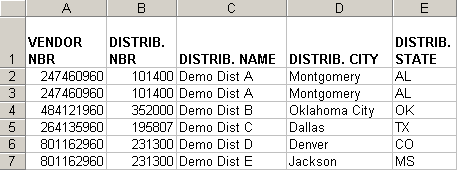
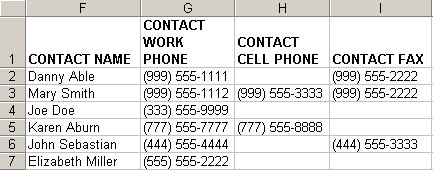
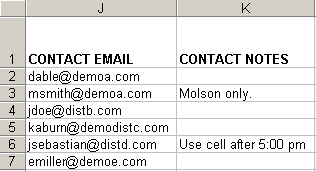
Columns
Col |
Field Name |
Description |
A |
VENDOR NBR |
Retailer's identifier for the distributor.
|
B |
DISTRIB. NBR |
Identifier used by MillerCoors.
|
C |
DISTRIB. NAME |
Distributor's company name.
|
D |
DISTRIB. CITY |
City portion of distributor address.
|
E |
DISTRIB. STATE |
State portion of distributor address.
|
F |
CONTACT NAME |
Contact's first and last name.
|
G |
CONTACT WORK PHONE |
Contact's telephone number at work.
|
H |
CONTACT CELL PHONE |
Contact's mobile telephone number.
|
I |
CONTACT FAX |
Contact's fax number.
|
J |
CONTACT EMAIL |
Contact's e-mail address.
|
K |
CONTACT NOTES |
Any notes relevant to the contact, such as a business title, brand line, or best times to reach.
|
Updated 12/7/2010